
Gen AI Made Simple: AI Agent Skills
We are all aware that LLMs, Large Language Models, are so intelligent. So intelligent that they can tell you anything about Spark architecture, anything about history, anything from any field of knowledge. They seem to know everything because they've been trained on just about everything. But there's one thing they lack: the “Procedural Knowledge”. They don't know how.
That’s exactly the gap that Agent Skills fill.
A model can write the SQL, draft the email, and document the table, but it just doesn't know how you want it done. A skill is how you teach it.
Here's what we'll learn today in this blog:
What is a skill? → How it works → Build a simple one
An Agent Skill
Imagine this: you put together a report every month. It is a long, exhaustive process that takes a few days to complete the report. Say it has around 50 steps to generate one report, and you do it every single month. Your LLM knows what to do, but doesn’t know how to do it in your tone, in your style.
That’s exactly what you explain the LLM to do: you feed your skills.md file(s) to the LLM and ask it to generate the report with the instructions present in these .md files.
How does a Skill.md file looks like :
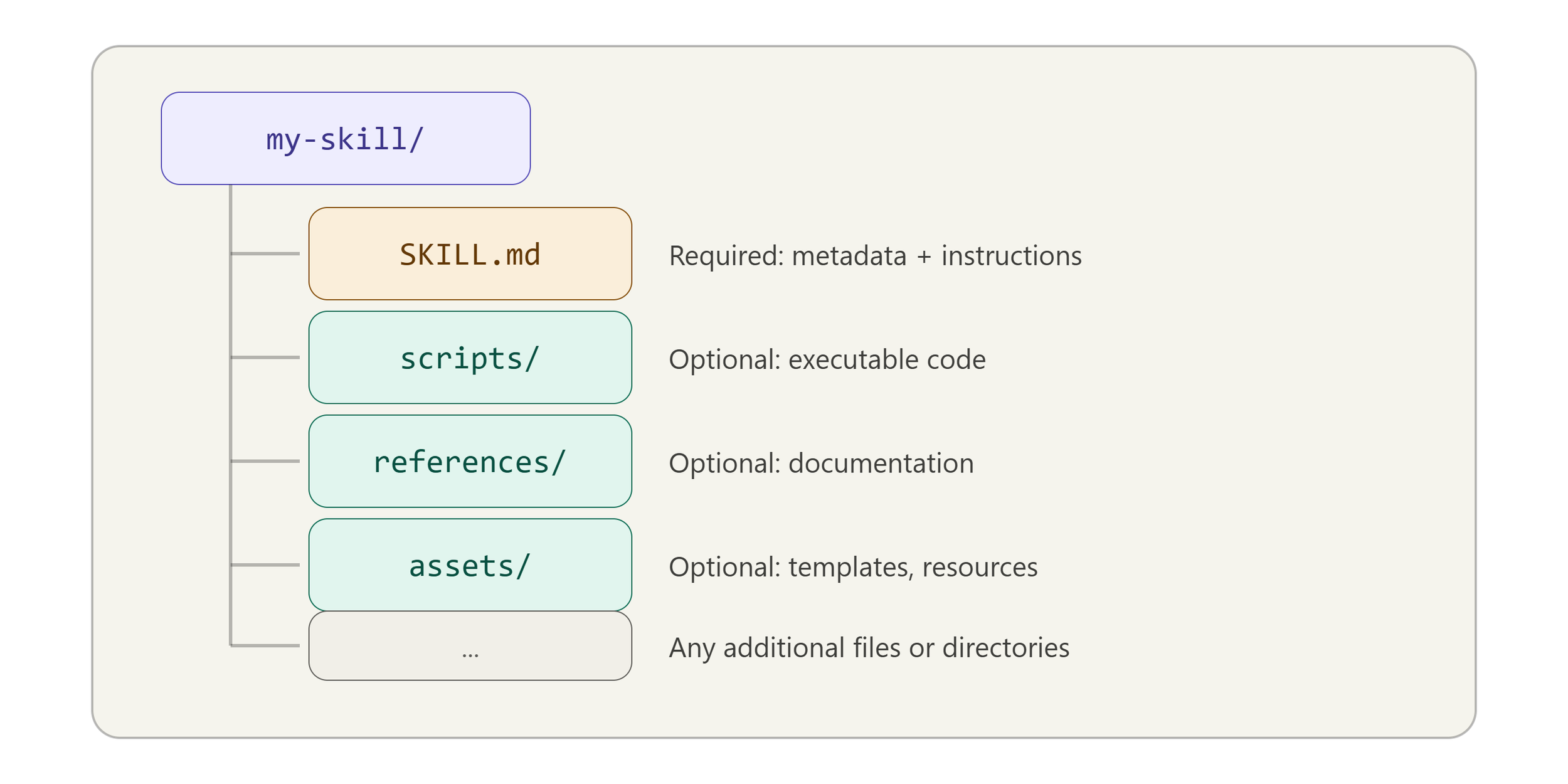
At a minimum, the skills folder has one skill.md file, which at least has two important mandatory fields
name - identifies the skill
description - describes what this particular skill can do and tells the LLM when this skill applies
The body - Instructions the agent follows when the skill activates.
Other than a skill.md file can also have any
scripts/
references/
assets/
Any additional files or directories
But agents can have lots of skills defined for them. Now, what happens when there are loads of skills as such? Isn't it going to blow up the context window if it has to go through every single skills folder to achieve a task?
How it Works:
Let’s see what happens behind the scenes. When your chat session gets started, the agent scans the default skill directory and finds your skill. It reads only the name and description, not the body or any other artefacts(that’s just a handful of tokens). Just the name and description. If the description matches what you are asking the LLM to do. Then it loads the body and all other references or artefacts you have in that folder
This is called ‘Progressive disclosure’, meaning letting the agent access many skills without loading all the instructions upfront, saving the context (that’s exactly what we need) just by scanning the description, which is why the description of a skill is quite important.
Example Skill:
I've got a growing list of complaints about never checking or replying to emails, so why not build a skill that does it for me?"
Email Triage
From Claude, I have connected to my Gmail account and added a skill called ‘Email Triage” under customise. Here is what the skill looks like
---
name: email-triage
description: Categorise and triage Gmail inbox emails, surfacing which ones need a response. Use this skill whenever the user asks to check emails, triage inbox, find important emails, see what needs a reply, do a daily email check, review unread messages, or says things like "check my emails", "what needs a reply", "email summary", "inbox review", "daily email check", "any important emails", "what did I miss", or "email triage". Also trigger when the user mentions running their daily/morning email routine.
---

# Email Triage Skill

Fetch, categorise, and present a prioritised summary of the user's Gmail inbox so they can quickly see what needs attention.

## How it works

This skill uses the Gmail MCP tools (`search_threads`, `get_thread`) to pull recent unread emails, then categorises each one and presents a clean summary grouped by priority.
This skill is going to load when I ask Claude to check my inbox - It is going to categorise my inbox and let me know what are the important emails that need replying - you can also have another skill to reply through the agent itself, but for now we just categorise my inbox and boom look at the output
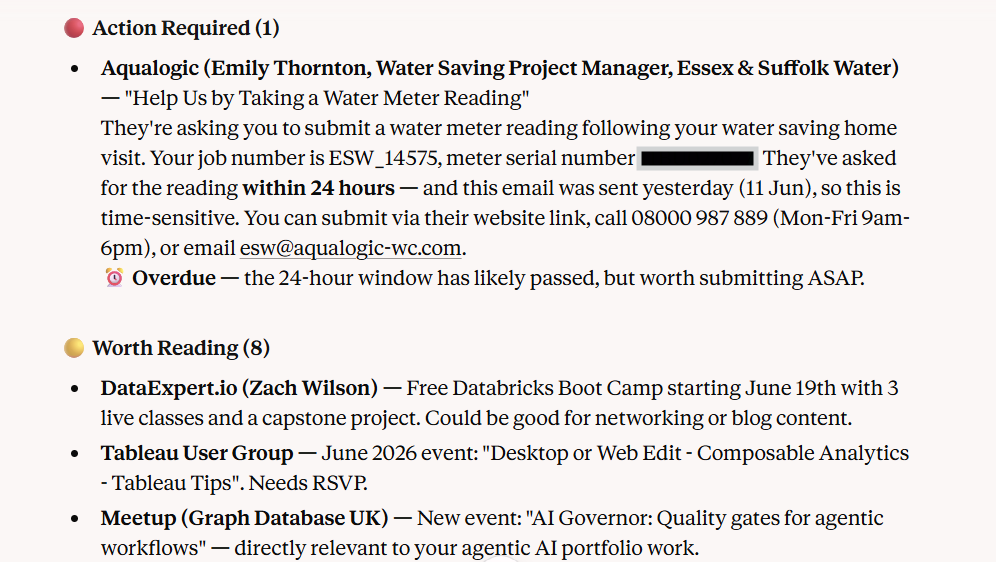
No doubt the complaints were valid. I'd missed an important update from my water supplier. This skill helped me work through my inbox and actually take action. Now, would I manually check each email myself, or just run the agent skill and let it do the work?
Wrapping up:
I hope this gave you a clear picture of what Agent Skills are and how they work in practice. This was a simple email triage example, but you can extend skills much further: entire projects, even full suites of automation. They're genuinely powerful once you start building with them. Hope this was useful. Thanks for reading.
#HappyLearning.
