
Databricks SQL Performance Guide
Why Is Your Databricks SQL Slow (Even When Your Query Looks Perfect)
Databricks makes it incredibly easy to write powerful SQL over massive datasets. But the moment your data grows to millions of rows and hundreds of files, with increased volume and variety, performance becomes architecture.
SQL performance in databricks isn't random. Multiple factors determine it. Let’s deep dive into every step to see how to improve the query performance, when to use what, etc.
I shall walk you through the top reasons Databricks SQL is slow, with some examples where possible
1 : Not using Delta Format
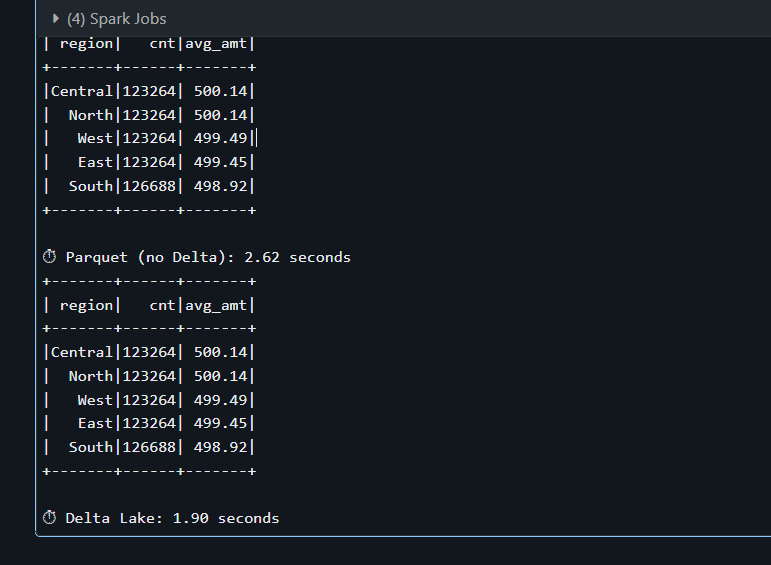
Databricks SQL is heavily optimized for Delta Lake Storage Format. If your tables are stored as Parquet, CSV or raw files instead of Delta , the engine looses several important optimizations. Delta Lake provides optimizations like transaction logs, metadata pruning, and data skipping which significantly improve query performance in Databricks compared to raw Parquet or CSV files.
Lets see how it looks :
Say for example, I have a data frame with 500000 rows , now I want to save it to a table as Parquet format and another one as delta format. Lets see how it compares. Look at the runtime of the Parquet table that took 2.62 seconds where as Delta table took me about 1.90 seconds. On small datasets the difference may be minor, but on large production tables Delta enables optimizations like data skipping and file pruning which significantly reduce scan cost.
2. Small Files Problem
We know that when data is written to a Delta table, it gets stored as parquet files in the cloud storage. If the ETL pipeline is creating hundreds or thousands of such such tiny files with 1 MB each in it instead of fewer larger files(128 MB- 1GB each) every query against the table pays a lot.
How do you see if your query is having Small Files Problem ?
This is one of the methods I tend to use. When you do a DESCRIBE DETAIL catalog.schema.table; This would return number of files and size in bytes. Now do the math Avg File Size in bytes = size in bytes/number of files simple! Spark typically targets ~128 MB partitions during execution, but Delta files in production are usually optimized between 128 MB and 1 GB. Anything between 128 MB and 1 GB is said to be healthy
Lets intentionally create two same outputs in different ways
using Repartition :
df_sales.repartition(200).write.mode("overwrite").format("delta").saveAsTable(tbl("sales_small_files"))
repartition(200) shuffles all 5 million rows in df_sales across 200 in-memory partitions , so now each partition becomes one file resulting in 200 small files If the data is around 400 MB each file would be approx. 2 MB - well, this is much below the ideal size we discussed earlier.
using Coalesce:
df_sales.coalesce(8).write.mode("overwrite").format("delta").saveAsTable(tbl("sales_optimized"))
coalesce(8) merges down to 8 without a full shuffle which results in 8 well sized Parquet files. Again, if the total data is about 400 MB then each file is going to be of size 50 MB , which is much closer to the optimal.
This is a huge topic, you can read more about this here.
3. Data Skipping:
When a query is slow, we mostly look at the total runtime, what is the warehouse size and how much CPU has been utilised, etc. But the first metric that should come into our mind is: “How much data is being scanned ?”
In distributed systems, IO dominates cost. If your query scans 200 GB of data to return 10 MB, performance will degrade regardless of the compute size.
Why is this important?
There would be two major phases for every query execution.
Data Scan (IO Bound)
Shuffle/Compute (CPU or Network bound)
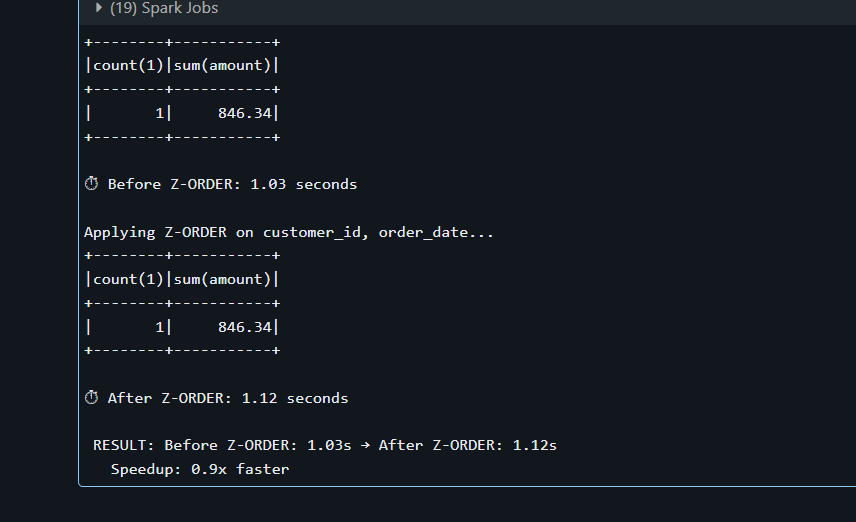
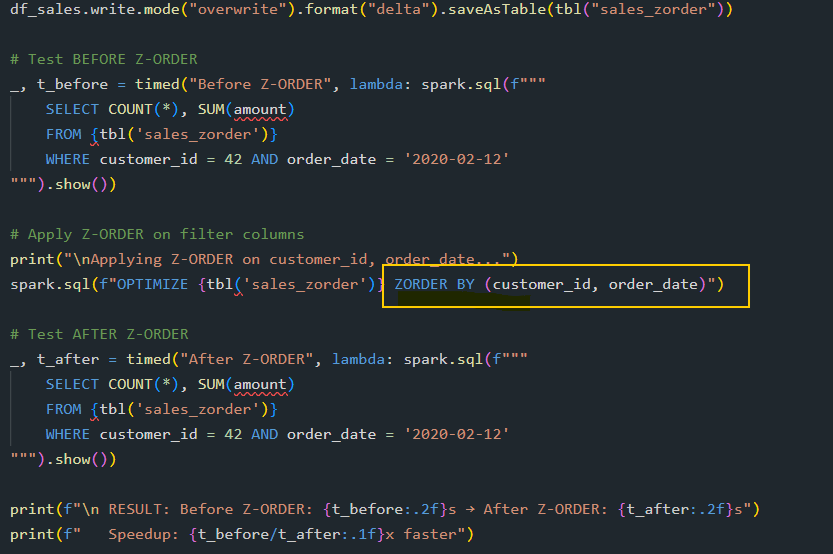
If the data you are scanning is huge, the rest of the execution inherits the cost automatically. For example, to return 100 records, do you want to scan the whole of 500 GB?. Here, we are not targeting a faster query; the goal is minimal data read for the result needed.
Z- Order is one such method used to reduce the amount of data spark needs to read from disk when your query has filters.
How it Works:
Without Z-ORDER, data is written to files in whatever order it arrives. A value like customer_id=42 could be scattered across all files, when you try to query on that condition, it would have to scan all the files if Z-order was not used.
Quick tip: If you are frequently using a particular filter in your queries, it’s always better to Z-Order that table with that filter
Databricks now recommends Liquid Clustering for newer runtimes, which dynamically optimises data layout and reduces the need for manual partitioning and Z-ordering.
4. Over-Partitioning vs. Smart Partitioning
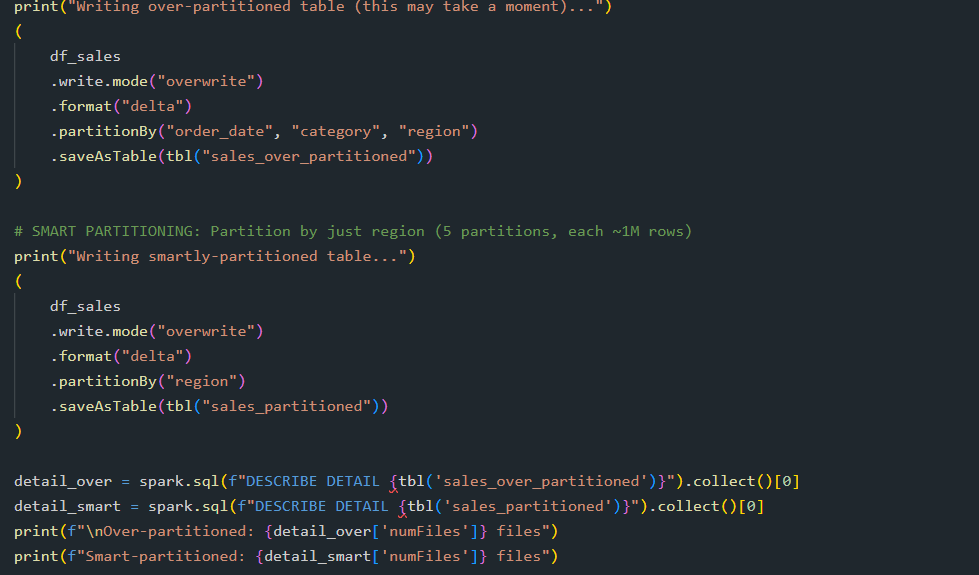
Too many partitions would create explosion with tiny files. Too few partitions don’t help with data skipping, you need to be wise when creating partitions
Quick tip: Each partition should have at least 1 GB of data.
In one example i have created partition by date, category, region (assuming 1460 dates, 50 categories and 5 regions!, now multiply it - it creates 365,000 partitions :D)
In other example for the same data set , I have chosen to create only partition by Region , leaving me 5 partitions 1M row per partition , considering our df_sales has 5M rows.
Number of tiny partitions create a lot of overhead , which is not what we want so we choose the partition by low- cardinality.
5. Inefficient Joins (Shuffle vs. Broadcast)
These two are the most common types and so we are considering this in our example.
Network Transfer is expensive. When joining a large table with a small table using a shuffle join moves data across the network which is an expensive operation. But when you do a broadcast join instead that is enough to fit in memory, spark can just send copy of the entire small table to every executor. No shuffling is required.
Wrapping up:
SQL performance in Databricks is rarely about the SQL syntax itself. In most cases, the real factors are how the data is stored, how files are organised, and how much data Spark needs to read and shuffle across the cluster.
When working with large datasets, performance tuning is less about writing clever SQL and more about designing the right data layout and execution strategy.
The fastest query is the one that reads the least amount of data. Understanding how Databricks organises and processes data will help you move from simply writing SQL to engineering performant data platforms. Thank you so much for taking the time to read this! See you in the next one.
