
Gen AI Made Simple : Exploring DSPy
In the previous posts of my “Gen AI Made Simple” series, we explored the fundamentals of prompt engineering and gained a solid understanding of RAG (Retrieval-Augmented Generation). In this post, we take the next step by introducing DSPy, a powerful Python-based LLM framework that enables prompt programming. DSPy helps us structure, optimise, and scale prompts in a more reliable and maintainable way as AI systems grow in complexity.
In Prompt Engineering, we provide an LLM with a prompt and expect it to produce the desired output. However, as workflows become more complex, you often have multiple prompts chained together, and the output of one step feeds into the next, forming an extended pipeline. Over time, as underlying LLMs evolve or get updated, previously tuned prompts can become obsolete, leading to inconsistent outputs, increased maintenance overhead, and technical debt in your application.
To address these challenges, we utilise a framework called DSPy, which enables us to structure prompts as reusable modules, optimise them automatically, and build scalable AI pipelines that remain robust even as underlying models evolve.
If you would like to follow along, you could install DSPy using the command below in your command prompt
DSPy Simple Prediction :
Lets you ask a language model a question and get an answer quickly.
You define the type of question (prediction signature) and run the model without a complex setup.
Run single-turn predictions with DSPy to quickly get answers from a language model.
import dspy
import os

lm = dspy.LM(model="openai/gpt-3.5-turbo")
dspy.settings.configure(lm=lm)

predict = dspy.Predict("question -> answer")
prediction = predict(question="Who is the first president of the UK")
print(prediction.answer)

lm.inspect_history(n=1)
import dspy

class UKQuestionAnswer:
    def __init__(self, model_name="openai/gpt-3.5-turbo"):
        self.lm = dspy.LM(model=model_name)
        dspy.settings.configure(lm=self.lm)
        self.predictor = dspy.Predict("question -> answer")

    def ask(self, question):
        result = self.predictor(question=question)
        return result.answer
- Use
lm.inspect_history(n)to see past predictions. - Batch or async requests for scale.
DSPy Chain of Thought
Now, let’s ask the model to think step by step with reasoning. If you aren't aware of what a chain of thought refers to, I would recommend checking the first part of the Gen AI made simple series.
Run Chain-of-Thought predictions with DSPy when you want the model to explain its reasoning step by step. Use CoT for:
- Complex decision-making tasks
- Debugging predictions by inspecting reasoning steps
import dspy

lm = dspy.LM(model="openai/gpt-3.5-turbo")
dspy.settings.configure(lm=lm)

cot = dspy.ChainOfThought("question -> answer, reasoning_steps")
result = cot(
    question="If you have 12 apples and give 5 to your friend, how many do you have left?"
)

print(result.answer)

print("\nReasoning Steps:")
for step in result.reasoning_steps:
    print("-", step)

lm.inspect_history(n=3)
[[ ## answer ## ]]
Answer: 7

Reasoning Steps:
- Start with 12 apples.
- Give 5 apples to your friend.
- Subtract 5 from 12 to find remaining apples.
- 12 - 5 = 7
[[ ## completed ## ]]
import dspy

class AppleProblemSolver:
    def __init__(self, model_name="openai/gpt-3.5-turbo"):
        self.lm = dspy.LM(model=model_name)
        dspy.settings.configure(lm=self.lm)
        self.cot = dspy.ChainOfThought("question -> answer, reasoning_steps")

    def solve(self, question):
        return self.cot(question=question)

solver = AppleProblemSolver()
result = solver.solve(
    "If you have 12 apples and give 5 to your friend, how many do you have left?"
)

print(result.answer)
print("\nReasoning Steps:")
for step in result.reasoning_steps:
    print("-", step)
[[ ## answer ## ]]
Answer: 7

Reasoning Steps:
- Start with 12 apples.
- Give 5 apples to your friend.
- Subtract 5 from 12 to find remaining apples.
- 12 - 5 = 7
[[ ## completed ## ]]
- Use
lm.inspect_history(n)to inspect model calls. - Chain-of-Thought is ideal for multi-step reasoning.
- You can define multiple outputs, e.g.
question → answer, reasoning_steps, hints. - Batch or async execution helps at scale.
- Inspect reasoning steps to validate model logic.
DSPy Multi-step Module:
So far, we have learned how to perform simple predictions and implement a single-step chain-of-thought. Now, let’s take it a step further with a multistep module. This module allows the model to reason in stages, first generating a detailed step-by-step thought process, and then producing the final answer based on that reasoning. This mirrors human problem-solving and enables more complex, accurate predictions
Run Multi-Step Chain-of-Thought predictions with DSPy when you want the model to reason in stages. Use Multi-Step CoT for:
- Debugging predictions by inspecting intermediate reasoning
import dspy

# Configure the LLM
dspy.configure(lm=dspy.LM("openai/gpt-4o-mini"))

# Define Multi-Step CoT module
class MultiStepCoTModule(dspy.Module):
    def __init__(self):
        super().__init__()
        self.step_by_step_chain = dspy.ChainOfThought("question -> step_by_step_reasoning")
        self.final_answer_chain = dspy.ChainOfThought(
            "question, step_by_step_reasoning -> final_answer"
        )

    def forward(self, question):
        reasoning_output = self.step_by_step_chain(question=question)
        reasoning = reasoning_output.step_by_step_reasoning

        answer_output = self.final_answer_chain(
            question=question,
            step_by_step_reasoning=reasoning
        )
        answer = answer_output.final_answer

        return dspy.Prediction(reasoning=reasoning, answer=answer)

# Instantiate the module
module = MultiStepCoTModule()

# Call the module
question = "If a train travels 60 miles in 1.5 hours, what is its average speed?"
result = module(question)

# Output
print("Question:", question)
print("\nStep-by-step Reasoning:")
for i, step in enumerate(result.reasoning, 1):
    print(f"{i}. {step}")
print("\nAnswer:", result.answer)
[[ ## output ## ]]
Question: If a train travels 60 miles in 1.5 hours, what is its average speed?

Step-by-step Reasoning:
1. Identify the total distance traveled by the train: 60 miles.
2. Identify the total time taken for the journey: 1.5 hours.
3. Use the formula for average speed: Average Speed = Total Distance / Total Time.
4. Substitute the values into the formula: Average Speed = 60 miles / 1.5 hours.
5. Perform the division: 60 ÷ 1.5 = 40 miles per hour.
6. Conclude that the average speed of the train is 40 miles per hour.

Answer: 40 miles per hour
[[ ## completed ## ]]
- Inspect
result.reasoningto validate the model’s logic. - Multi-Step CoT works best for staged reasoning tasks.
- Swap LLMs via
dspy.configure(lm=dspy.LM(...))to compare results. - Numbered steps improve debuggability and explainability.
- Advanced workflows can chain multiple CoT modules together.
DSPy - RAG
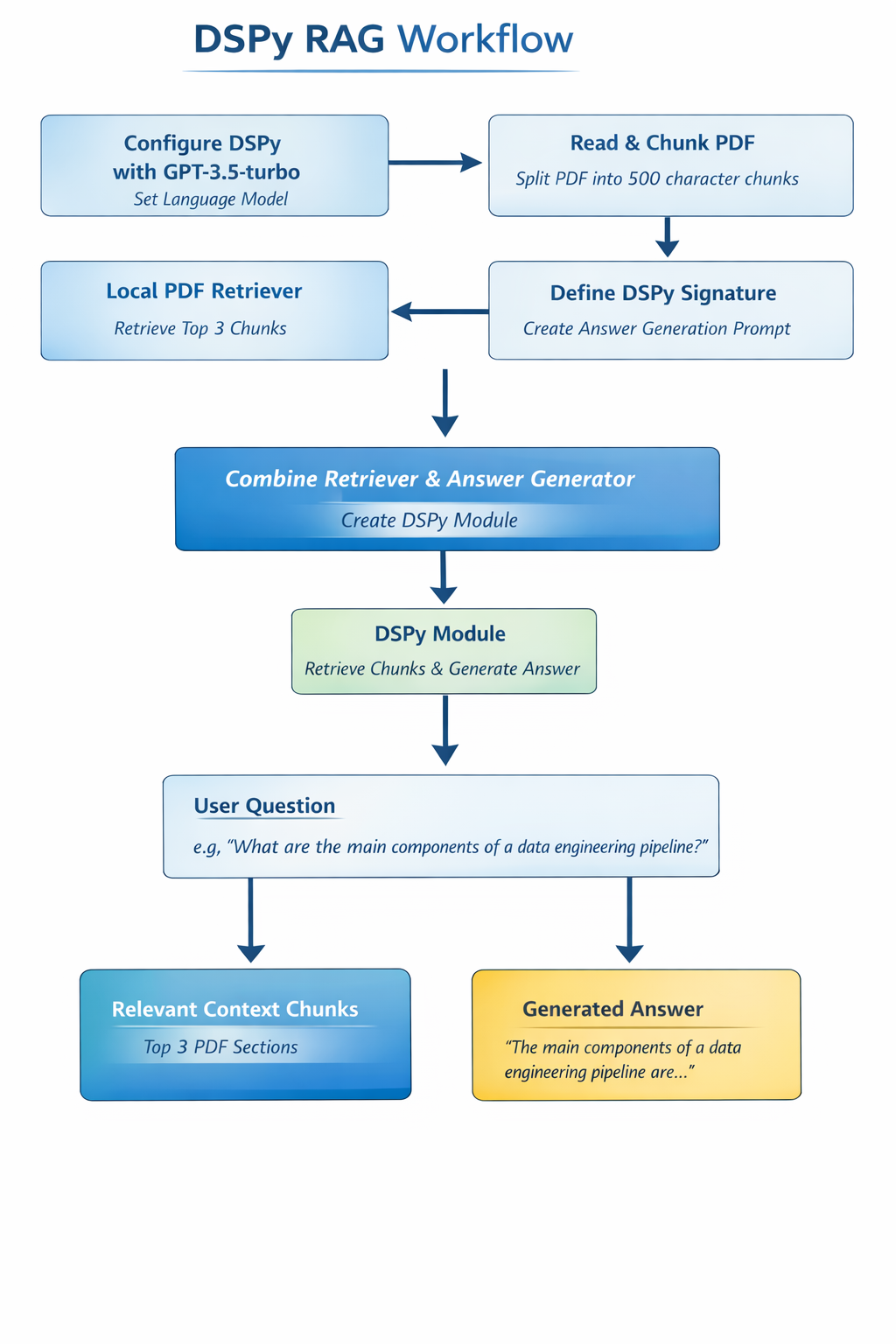
In the previous blog, we learnt about RAG. Now, let’s see how we can build a local RAG system using DSPy. I wanted to use a local PDF and have the model answer questions based on its content.
First, I configured DSPy to use GPT-3.5-turbo as the language model so that it could generate answers from the context retrieved from the PDF. Next, I read the PDF using PyPDF2 and split it into smaller chunks of around 500 characters each to ensure that the LLM could process the text efficiently.
Since DSPy’s built-in retrievers, like ColBERTv2, were not available locally, I created a simple local retriever that returns the top three chunks from the PDF, which acts as the retrieval part of the RAG system. Then, I defined a DSPy Signature to generate answers, feeding the retrieved chunks as context to the LLM so that it could provide relevant responses.
After that, I combined the retriever and the answer generator into a DSPy Module, allowing the system to take a question, retrieve the relevant chunks, and produce an answer in a single step. Finally, I asked questions about the PDF, such as “What are the main components of a data engineering pipeline?”, and the system returned both the most relevant context chunks and a short, factual answer.
This approach resulted in a fully functional local RAG system that can answer questions based on any PDF entirely offline, using DSPy.
The local RAG system enables context-aware question answering directly from a PDF or document. With this capability, you can:
- Ask specific questions and get concise, factual answers extracted from your document.
- Automatically retrieve the most relevant sections of large documents without reading them manually.
- Combine retrieval and LLM reasoning to handle complex queries with multiple-step logic.
- Replace chunk retrieval with embedding similarity search.
- Increase chunk overlap to preserve context.
- Inspect
output.contextto see contributing sections. - Chain multiple DSPy modules for multi-step reasoning.
- Tune the LLM or prompts for better accuracy.
Wrapping Up:
Today, we explored several key capabilities in building intelligent applications with DSPy. We started with simple predictions, moved on to chain-of-thought reasoning, implemented a multi-step module for staged problem-solving, and finally built a local RAG system to answer questions from PDF documents. All of these examples were implemented using DSPy’s modular framework, showing how easy it is to combine retrieval and reasoning. You can check out the GitHub to follow.
Many recent language model platforms now support built‑in retrieval features, which can reduce the need for external tools like DSPy in some scenarios. However, DSPy remains a flexible and transparent way to experiment with custom retrieval pipelines, multi‑step reasoning, and modular AI workflows, especially when you want fine‑grained control over exactly what documents are searched and how context is used.
See you again in the next blog. Thanks for reading so long, and until then, #HappyLearning!
