
Understanding The Databricks AI Developer Kit - Part 1
We are all aware that AI coding agents are very good at writing code. But there is still a gap. Most of them don’t completely understand how platforms work under the hood. Resulting in hallucinating the solutions, and we have been there, scratching our heads for the results it has produced.
Now, imagine this: what happens if we teach ai assistant how a complete platform like Databricks works? from its best practises to building end-to-end production-ready pipelines. Isn’t it amazing?
And, that’s the idea behind “Databricks AI Dev Kit”. It’s a developer’s kit, where the developer uses this kit via an IDE like Cursor or Claude, etc., connects to its MCP and provides the prompts for it to do the job that a developer absolutely does! damn, isn’t this idea amazing!!!
This capability was launched very recently by Databricks. So naturally, the first thing I wanted to do was try it myself.
But before we jump into connecting this to Cursor and seeing the magic in action, two important questions usually come up.
How does this actually work, and more importantly, what about the security and guardrails?
Let’s quickly unpack
Guardrails: Whenever an AI assistant is given the ability to interact with a real workspace, security becomes critical. The Databricks AI Dev Kit addresses this through a controlled interaction model.
Instead of giving the AI unrestricted access, the Dev Kit exposes a defined set of Tools and Skills through the MCP (Model Context Protocol). These tools are the only actions the assistant is allowed to perform.
But every action still respects the existing Databricks authentication and permissions model. Meaning, the AI assistant can only do what your user identity is already allowed to do in the workspace. For example, if you don’t have permissions to create a unity catalog, the assistant wouldn’t be able to do that either because the AI assistant is identified as you! So the guardrails are not an afterthought, they are built on top of Databricks existing security and governance layers.
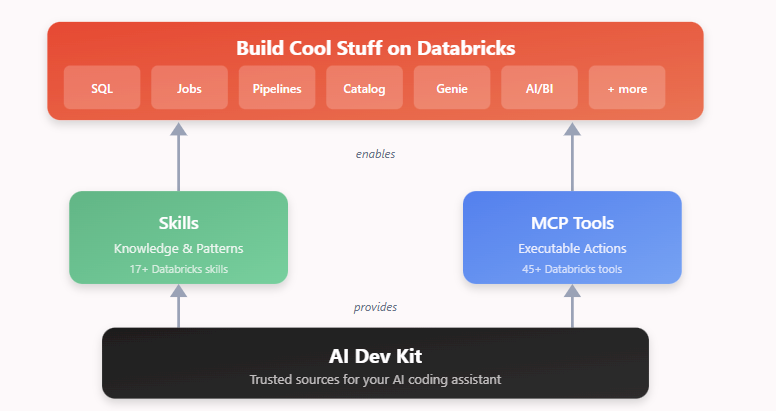
This dev kit gives the AI assistant two important capabilities:
1. Skills
These teach the assistant how Databricks solutions are typically built — things like using Auto Loader for ingestion, writing data to Delta tables, or structuring pipelines with proper checkpoints.
2. Tools (MCP tools)
These allow the assistant to actually interact with your Databricks workspace, running SQL, creating tables, or deploying jobs.
So when the prompt is sent, the assistant doesn’t just generate code. It behaves and does exactly what a developer can do.
Wrapping Up:
Instead of AI assistants just helping us write code, they can now understand the platform, follow best practices, and interact with the workspace itself.
In other words, this isn’t just another tool added to the developer workflow. The Databricks AI Dev Kit acts more like a platform layer that allows AI assistants to operate inside the Databricks ecosystem with awareness of its architecture, governance, and engineering patterns.
Under the hood, it leverages concepts similar to the Model Context Protocol (MCP) to expose controlled tools and skills to the AI assistant, allowing it to interact with Databricks in a structured and secure way.
That’s a pretty significant shift in how development workflows might evolve.
In the next post, let’s get hands-on and see how to connect the Databricks AI Dev Kit to Cursor and try building something with it. Hope to see you there!
#Happy Learning!
